

When your website is in maintenance or offline, visitors see a system page. You can replace that page with your own design, with your logo, your colors and a message in your own words, so visitors see your brand instead of the WEMASY page. WEMASY shows your page automatically when it exists at the right address.
How it works
- In Maintenance mode, WEMASY shows your page at /maintenance. Without that page, visitors see a default maintenance page.
- In Offline mode, WEMASY shows your page at /offline. Without that page, visitors see the default WEMASY offline page: it says the website is offline for now, mentions that it runs on WEMASY, and has a Log in to manage your website button so you can put it back online. It follows the visitor's browser language (English, Dutch, German, French or Spanish).
Create a custom maintenance page
- Open Pages in Website Builder.
- Create a new page.
- Set the page URL to /maintenance.
- Design the page: add your logo, a short message and, if you like, a way to reach you.
- Save the page.
- Publish your website so the page exists on the live site.
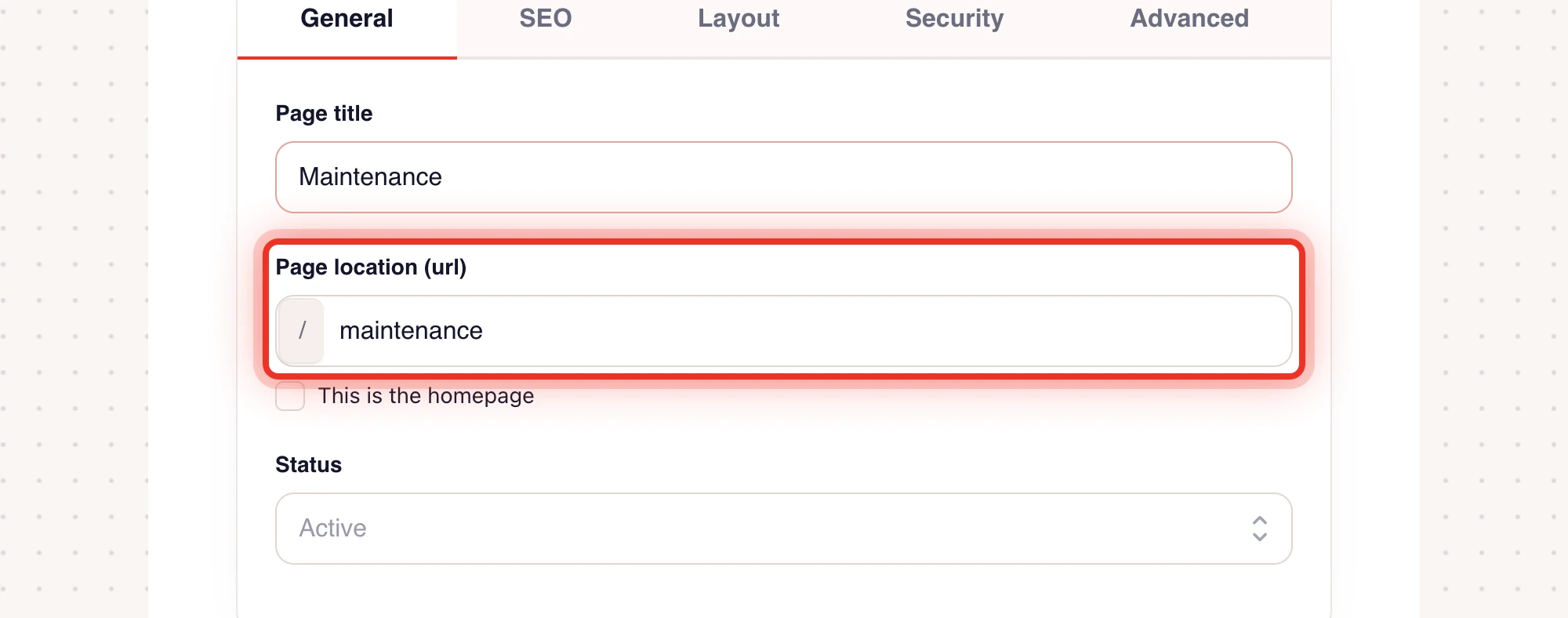
For an offline page, follow the same steps with the URL /offline.
Switch the mode on
- Click Settings in the top right menu.
- Open the General tab and scroll to the Danger Zone.
- Under Website availability, click Maintenance or Offline.
- Confirm. WEMASY republishes your website with your page.
See Website availability settings for the details of each mode.
What to put on the page
- Say what is happening in one sentence, for example that the shop is being updated.
- Say when you expect to be back, if you know.
- Give visitors a way to reach you, such as an email address or phone number.
- Keep the page light. Leave out menus and links to pages visitors cannot open.
Tip: keep the page out of search results. Switch on Do not index in search engines in the page settings, so search engines do not show it when your site is live. See Page settings and SEO.
To create and manage pages, see Creating a new page.
Frequently asked questions
I created a /maintenance page but visitors see the default page.
Check that the page URL is exactly /maintenance, that the page is published, and that you published your website after creating it. Then switch the availability to Maintenance again.
Can visitors open the page while my site is live?
Yes, the page exists like any other page. Switch on Do not index in search engines and leave it out of your menus so visitors do not find it.